Plugin SDK
Build the piece that is missing, inside KeelOps.
A plugin is a folder of JavaScript that KeelOps loads into its own process: it uses its sign-in, its permissions and its look, reads its data, and shows up where the work is — in the menu, on a project page, in a task's detail, in the top bar. No second server, no tokens to hand out, no dependencies to install. The SDK is free (AGPL), and a plugin states in its manifest whether it needs the pro edition.
What you can build
What only your team needs, with the rest of KeelOps around it.
A page in the menu
An entry with its icon, a page that opens inside the application and takes its colours, the light or dark theme and the reader's language.
Inside the work
A command on a project page, a panel in a task's detail, a button among a deal's attachments, a tile on the dashboard: anchors bring the plugin where it is needed.
Data of your own
Tables of your own in the same database, with their migrations, on both engines — SQLite and MariaDB. KeelOps' backup carries them along.
Reports and release notes
The work done becomes a document people read, written by AI models on your own server: for users, for the administration, for sales.
Tools for assistants
A plugin offers tools to the others, through the core: that is how Claude, ChatGPT and Mistral read QABox's quality data, with the permissions of the person asking.
The core's work, with its rules
Create a task, attach a generated document, own a group of people: the plugin goes through the core's doors, with the usual permissions, notifications and history.
An example
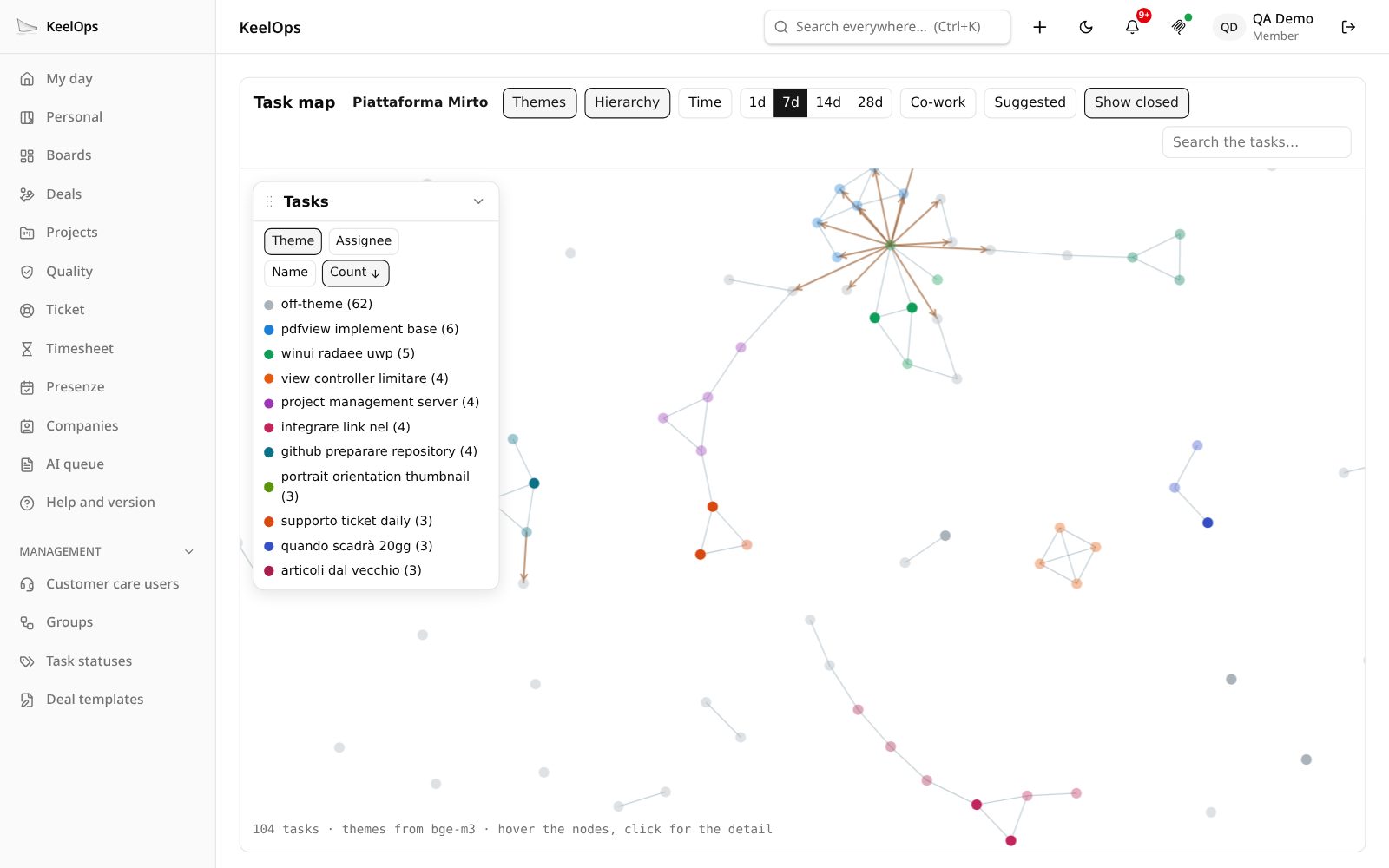
The task map: a plugin inside a project page.
It has no menu entry: it opens from the ⋯ menu of a project. It reads the tasks with the viewer's permissions, draws their themes from the text with the local models, and lays them out as a network — hierarchy, time windows, who worked with whom, and the links it suggests adding.
Local AI
The work done becomes a document people read.
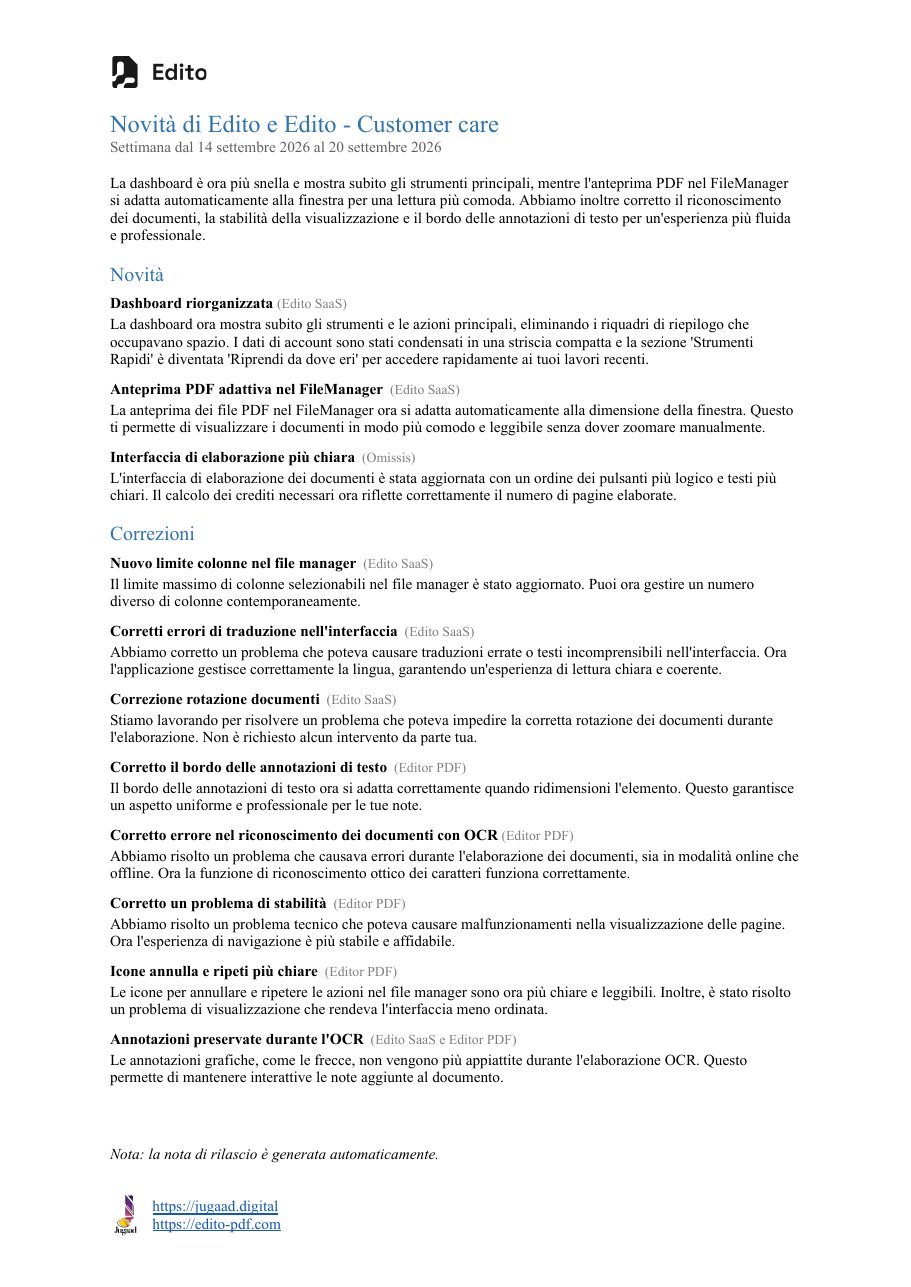
KeelOps knows what was done, for whom, in which week. A model running on your own server — Ollama, nothing leaves the company — turns it into text for the people who need to read it.
- Release notes for the users of a product, week by week, split into new features and fixes.
- A customer's month for the administration: requests opened, work done, hours per activity, in plain words.
- The week in deals for sales: what moved, what is stuck, who to call back.
- The month's non-conformities for quality, with the actions that closed them.
The model writes the sentences; what goes in and the numbers are decided by the code. Without a model the document still comes out, with the titles in place of the sentences, and says so. It is the same recipe as the release notes KeelOps already generates — next to this, a real one, sent to the users of a product.
Where to start
A plugin in twenty lines.
A manifest that says who it is and where it shows up, and a create(ctx) function that receives the database, the session and the doors from the core, and returns its routes. Add its name to PLUGINS, restart, and the entry is in the menu.
// plugins/Hello/plugin.mjs
export const manifest = { nome: "Hello", versione: "0.1.0", ui: { voce: "Hello", icona: "puzzle" } };

export async function create(ctx) {
  const { json } = await import(`${ctx.sdkDir}/http.mjs`);
  return {
    routes: [
      ["GET", /^\/api\/summary$/, async (req, res) => {
        const user = await ctx.sessionUser(req);          // the real KeelOps session
        if (!user) return json(res, 401, { error: "no session" });
        const row = await ctx.db.get(                      // the KeelOps database, read-only
          "SELECT COUNT(*) AS open FROM Task t JOIN TaskStatus s ON s.id = t.statusId " +
          "WHERE t.assigneeId = ? AND s.isClosed = 0 AND t.deletedAt IS NULL", user.id);
        json(res, 200, { name: user.name, open: row.open });
      }],
    ],
    staticDir: new URL("./ui", import.meta.url).pathname,  // a page, inside the app
  };
}
Plugin code and comments are in English, like the documentation; pages are translated into KeelOps' five languages with a single mechanism, provided by the SDK.
The rules
Inside the process, inside the rules.
A fenced database
Reads go through a connection that cannot write; writes only to the plugin's tables, and the gate reads every statement before letting it through.
KeelOps' session
Every route goes through the core's session guard. Portal customers never reach plugins, and a plugin shows only what the person may see.
Everything through the SDK
No direct access to the database, the server's environment or the models: a test in the core reads every plugin's sources and stops on a forbidden import.
On and off
From the System page the administrator sees each plugin's version, licence and description, and switches it off without a restart. Off, it disappears; its data stays.
The documentation.
Step-by-step guides, examples, the rules and the complete API reference, in eleven chapters.