Not a CRM: the dashboard of your team
Tasks, kanban, projects and deals: one tool for your company and your teams.
KeelOps puts the work to be done at the centre: task management with kanban boards, project management, deals on a pipeline (a minimal CRM, not a CRM), deadlines that come back and hours on any task. The pro edition adds the requests of your customers, from your help desk or from your own application. For teams of five to thirty people. Free software on your own server, or in the cloud at a price you will not notice.
Two public demos with the same made-up data: community.keelops.it is the free edition (AGPL), demo.keelops.it the pro one.
Why the name
You never see the keel. It is what holds everything else up.
The keel is the beam that runs from bow to stern along the bottom of a ship. The masts rest on it, and so do the cabins, the cargo and the crew. Nobody looks at it, nobody photographs it; but if it does not hold, nothing holds — and without it a ship neither runs straight nor sails into the wind.
For a small company, business software should be exactly that: the structure under everyone’s daily work, solid and silent. Not one more thing to look at, but the thing that holds the others up and keeps the course.
Where we come from
Two excellent tools, and a gap in between.
For our small team we paid about $2,500 a year: one tool held the administrative calendar and the deals, the other the projects and the hours. We used a fraction of both, and keeping everything on one of them did not work: ClickUp as a CRM was awkward for administration and for the sales people, and Monday for projects always left gaps against the way we actually work. And above all: a won deal became a project by hand; a delivery became an invoice to record by hand, if anybody remembered; a customer request arrived from a third program altogether.
A small company's work does not live inside a tool: it lives in the handovers between one tool and the next. That is where things fall. KeelOps was built to close that gap — not from a blank page, but from real data, imported from Monday, ClickUp, osTicket and customers' spreadsheets.
Who it is for. Small and medium teams — five to thirty people — that want, in one tool, task management with kanban boards, projects, deals on a pipeline (a minimal CRM, enough for those who sell a few complex things) and the customer requests that arrive from an external help desk. Software houses, engineering firms, agencies, consultants: the owner decides, not an IT department.
The thread that holds it together
The software does the handovers, not your memory.
Deal won → invoice · free
The task for administration is born by itself: same title, same attachments, on the right person's desk.
Deal won → project · pro
The model reads the deal’s documents and proposes the project, with the salesperson already a member and the kick-off assigned to the manager you pick. In the free edition you link the deal to the project by hand; the link holds both ways.
Ticket → project task · pro
The customer’s request lands where the work happens, not on an island: from the customer portal, from your osTicket help desk or from a form inside your own application. It is born on the right project, with its original reference.
Deadlines that come back · free
The hardest part of administrative work, and here it is a single rule: every day, every week, the 15th of the month, the first Tuesday, the last day of the month, every two months, quarterly, twice a year, yearly. Occurrences generate themselves sixty days ahead; close one and the next takes its date.
Hours on any task · free
A development delivery or a tax deadline: you log them where you work, in the month or week grid, and the summaries by project and by person come out without reconstructing anything.
A task converts · free
From deadline to deal, from deal to project: it changes nature, not identity. The hours logged stay with it.
What it does
Six areas, not forty modules.
The screens below come from the public demo: made-up data, real product.
My day
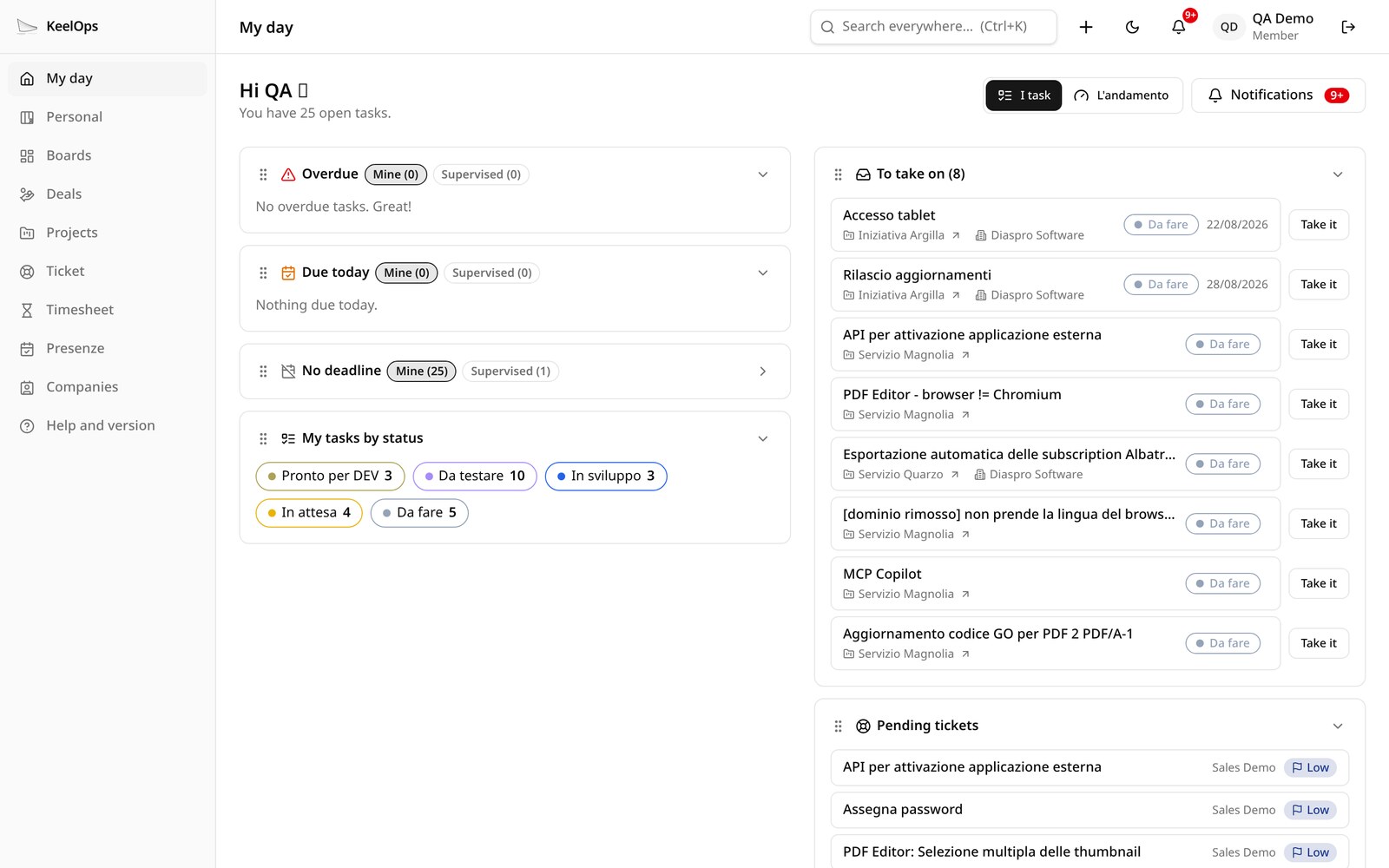
What is late, what is due today, what is coming; the shared queue to pick up; open deals (and, with pro, waiting tickets). For whoever leads development, the area at a glance: flow, queue, WIP limits, hours per project, overdue work per person. The counters are also the filter, and every tile moves and collapses the way you want.
Deals · free
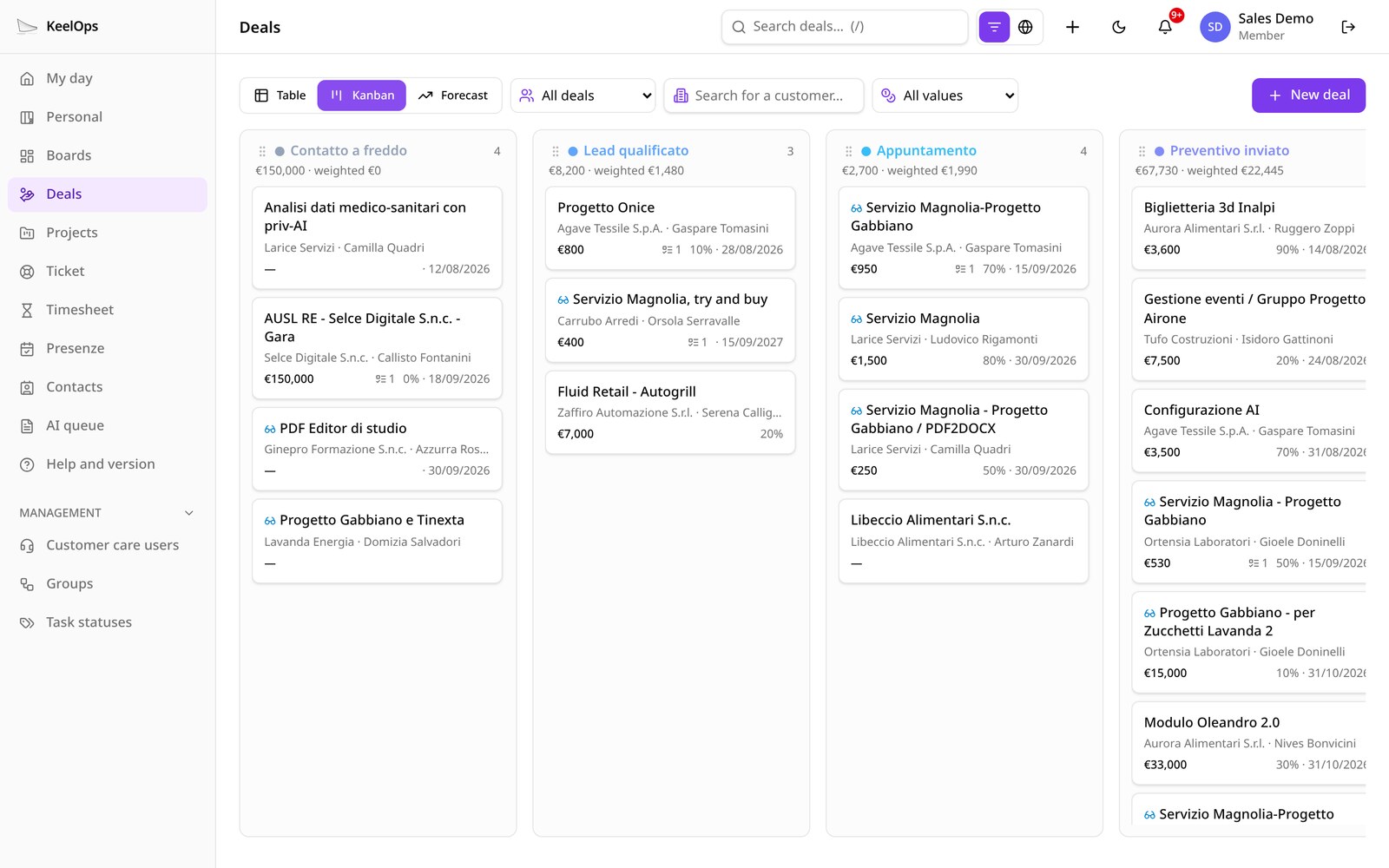
Kanban pipeline by stage, with the value and the weighted value at the top of each column, monthly forecast, reason for the loss. A minimal CRM: companies and contacts live in the directory, not in a separate CRM.
Projects · free
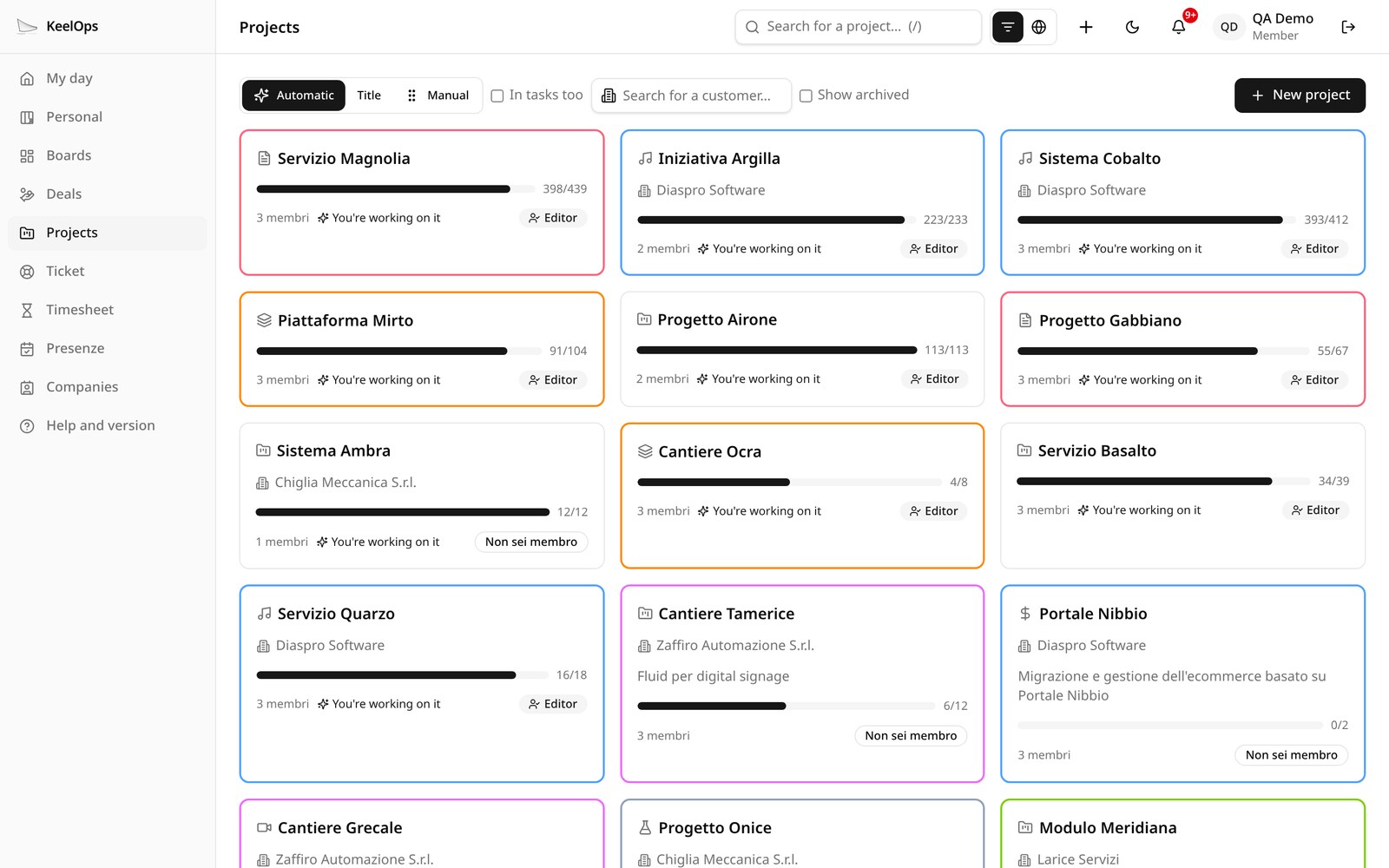
Members with roles, tasks and subtasks, prerequisite sequences, progress; every project has a list and a kanban by status, with work-in-progress limits; release notes are written from the work closed in the period.
Timesheet
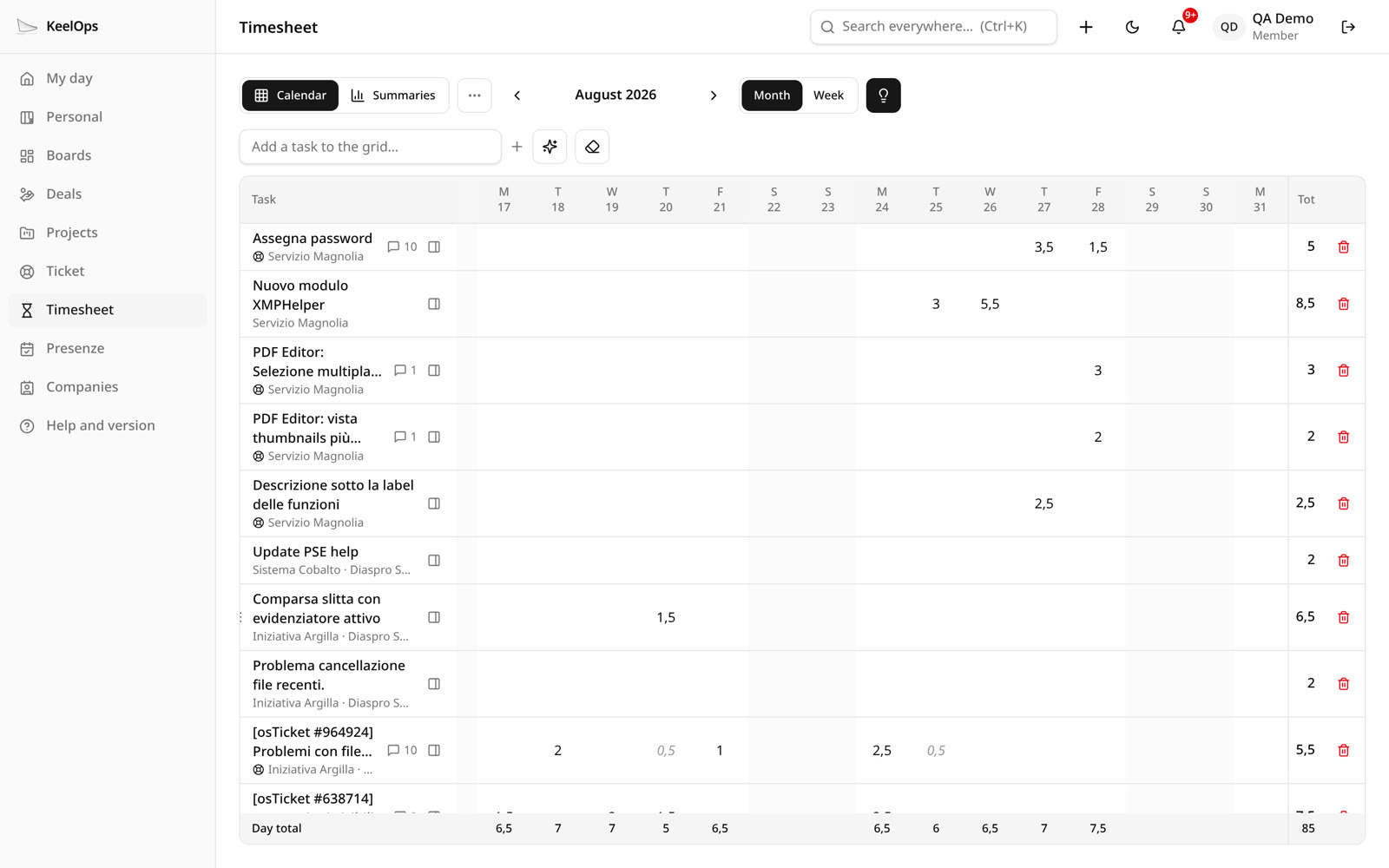
free A month or week grid, hours on any task you can see, summaries by project and by person for managers, month closing. pro Hours suggested from your activity, reminders, productivity, per-customer reports, export, and absences from the company calendar, so the coverage figure tells the truth.
Tickets, customer portal and external help desks · pro
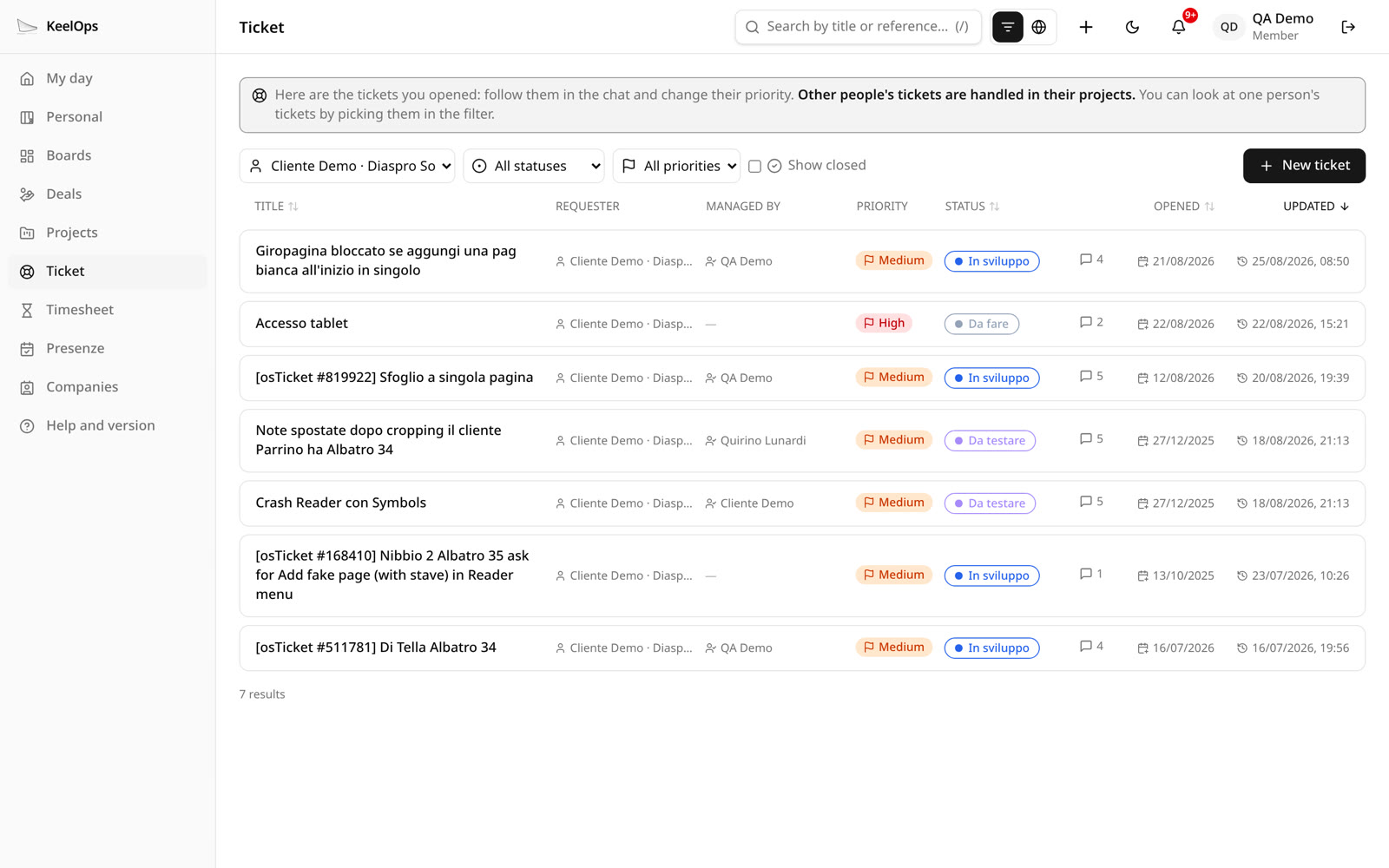
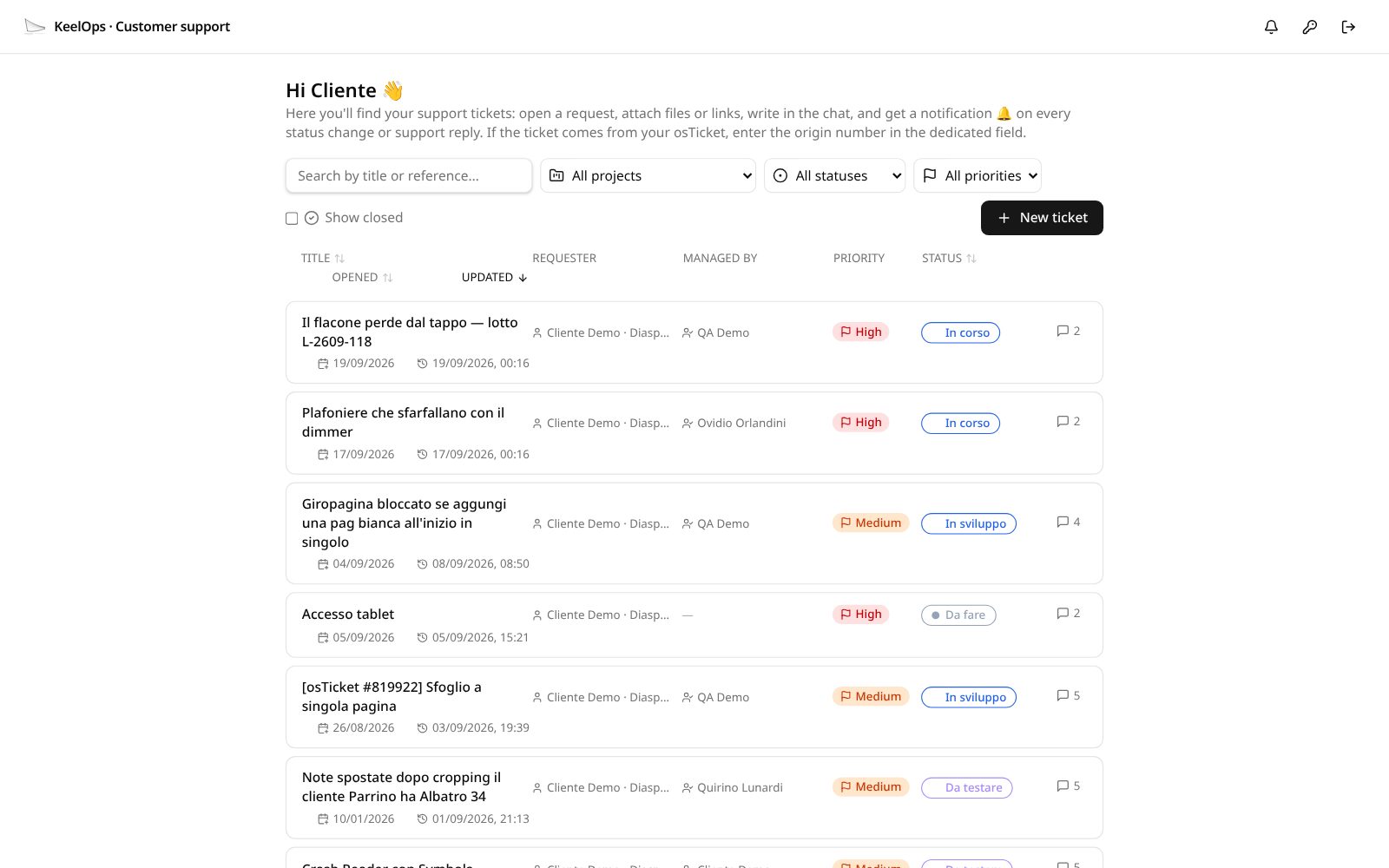
The customer opens the request from their portal and sees only their own; whoever uses your osTicket help desk or your application opens it from there, without changing program. Inside the company it is a project task like any other, with hours and a supervisor, and it carries the reference of the original ticket.
Administrative calendar · free
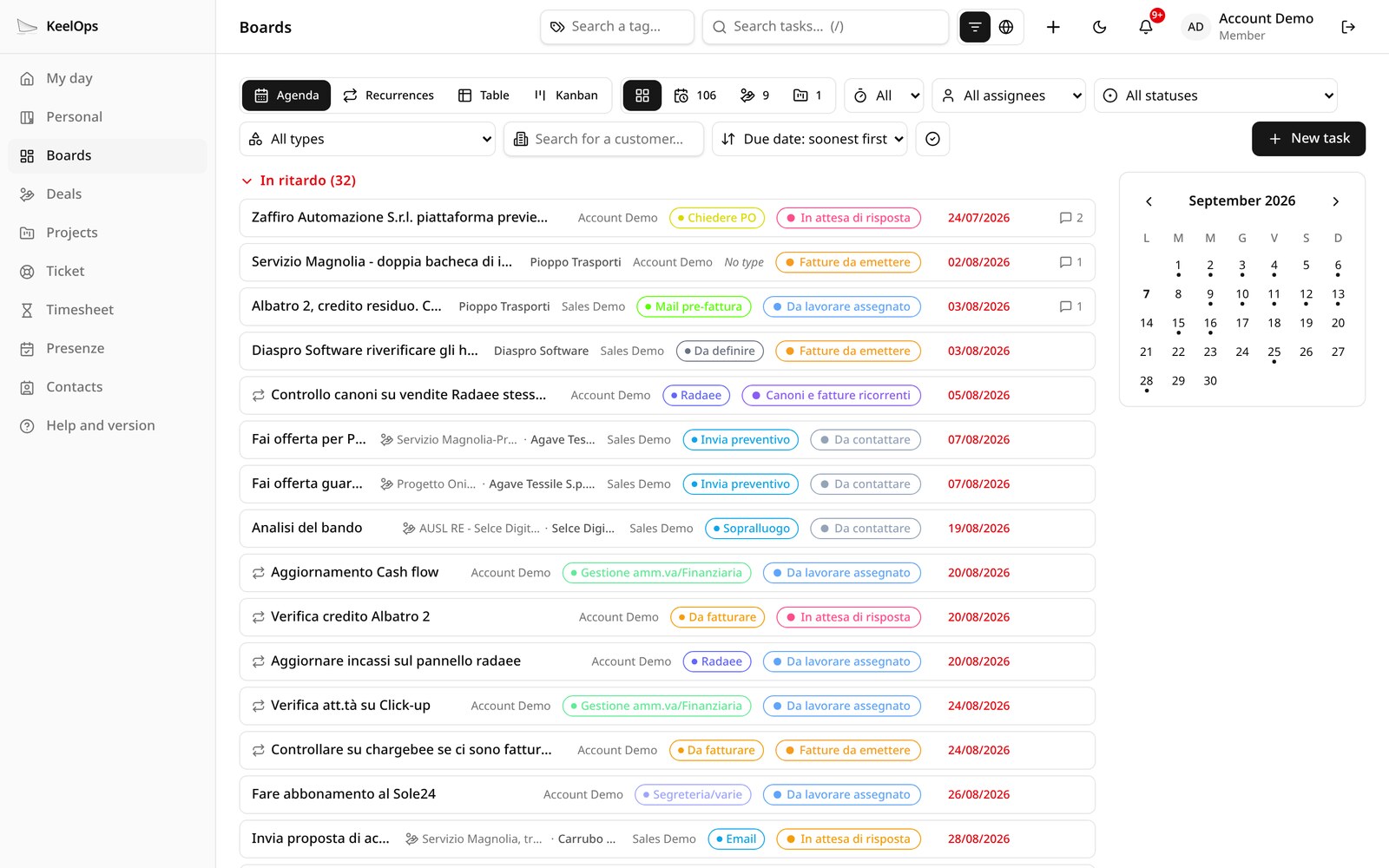
Administrative work and recurrences — the thing no other tool did well for us: fees, compliance deadlines, invoices that come back. Every deadline repeats the way it really repeats:
- every month, every two, three or six months, every year;
- every fortnight, or every N days;
- every week or every two, three, four weeks, on the day you choose;
- at the end of every month, even when the month has 28 days;
- the first Monday of the month, the third Thursday, the last Friday.
The rule reads in plain words and, before saving, you see the next five dates; for the rare cases there is the full rule (RRULE, RFC 5545). Agenda, table or kanban; filters and sorting are remembered on their own.
Integrations
The doors you need, and no marketplace.
Your customer does not need to learn another program: with the pro edition the request is born where they already work — your help desk, your application — and in KeelOps it becomes a task on the right project, in the name of a real person and with their permissions. Calendars and AI assistants are in the free edition too.
osTicket · pro
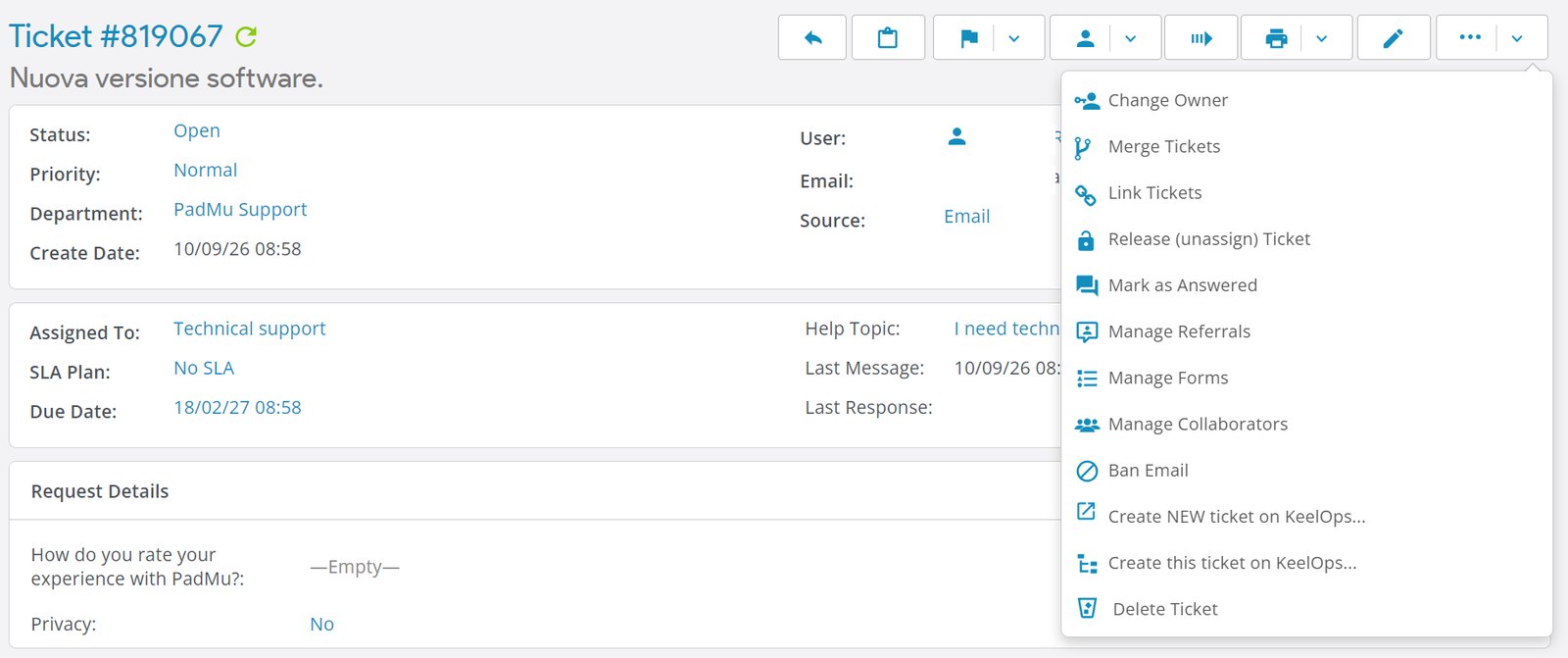
A plugin for osTicket, written by us: the interface lives inside osTicket, and from the user’s ticket the agent creates, through the API, the task on the right KeelOps project — title, description, priority, attachments and the [osTicket #4821] reference with a link to the original ticket. This is how the help desks of PadForMusician and RadaeePDF work.
Inside your own application · pro
A JavaScript component that injects the interface into the remote platform: one line of script, and your users open a request from a menu item or a button, without an account in KeelOps. Technical and sales support go to two different projects, the person who wrote receives a confirmation in their language, and the data needed to understand the context is appended to the ticket. It is the component used by Edito-PDF.com.
API for integrations · pro
A service account opens requests and deadlines on behalf of a person, with their permissions and their name in the history: a ticket opened through the API cannot be told apart from one opened by hand. The list of projects that person may open on, attachments, a direct link to the opening form.
Google Workspace · pro
Sign-in with the SSO of your domain, the Drive picker and preview in attachments, absences read from the company calendar. The iCal feed of the deadlines for Google Calendar, Outlook and Apple Calendar is free instead.
Claude, ChatGPT, Mistral · free
Through the MCP connector the assistant you already use reads tasks, deals, projects, contacts and your own hours with your identity. With pro, tickets and statistics too. Read-only: no tool writes.
The data you already have · free
Imports from Excel files with downloadable templates, from iCal calendars and from contacts exported by Google Contacts. CSV export of tasks and deals.
Professional services
We help you move your data from ClickUp, Monday, Jira and other platforms — projects, tasks, comments, hours — and build custom plugins for the work only your team does. Write to us.
No integration marketplace, on purpose: these are the doors a small team needs, and they are all in the product or in a plugin.
Plugins
The core is free. The pro plugins add what takes real work, and need the pro edition.
A plugin loads inside the application: same authentication, same permissions, same look — light and dark theme included. No extra process to keep alive, no tokens to hand out.
Personal boards · free
Everyone’s own kanban, with the columns they choose and templates. They appear on the dashboard next to work tasks.
Task map · free
The network of a project’s tasks: themes from the text, hierarchy, time windows. It rebuilds itself. It is also the example of what a plugin can do; co-work, made of hours, comes with the pro timesheet.
MCP connector · free
Claude, ChatGPT and Mistral read KeelOps with your identity and inside your perimeter. No tool writes.
Attendance · pro
Holidays, leave, sickness and remote work per person and per team: everyone corrects their own days, a manager those of their group.
QuoteDOCX · pro
The deal document is written in KeelOps from the company’s Word template, and out comes a real .docx with its PDF, attached to the deal. How it works →
QABox · pro
Quality for manufacturers: specifications, inspection plans, measurements on batches and serial numbers, a signed verdict. Non-conformities are tickets and tasks. How it works →
MCP connector: free and pro side by side
Both versions answer on the same address: an assistant already connected never notices.
| What it does | Free | Pro |
|---|---|---|
| Read tasks, deals, projects, contacts and your own hours | yes | yes |
| Tickets and hours statistics | — | yes |
| The identity and permissions of the person connected | yes | yes |
| Attached documents (PDF, Word, text) | extracted text | full extraction, spreadsheets and presentations included |
| Google Drive per user | — | everyone connects their own account; Docs, Sheets and Slides are really read |
| Privacy filter (pseudonymisation) | — | the names of people, customers, companies, products, VAT numbers and e-mails become stable placeholders before the text leaves: on CPU, in house |
| Search inside the documents | — | full text, with the passages and where they come from |
| Similar documents | — | by content, with the models in house |
| The history of a project | — | in time order, inside a window you ask for, with the versions of the same document |
In the cloud the pro plugins are included: there are no modules to buy and no credits to top up.
Artificial intelligence
AI in house: the queue is free, the features are pro.
The models are local and on by default: they run on the company’s own machine, and no text, document or logged hour leaves for an outside service. Before we trust a model with a field we measure it against the dumbest possible answer — three tasks that lost stayed out — and what remains proposes: the decision belongs to whoever reads. The free edition has the job queue and the connection to a local model through Ollama, for plugins; the features below belong to the pro edition.
- A vector index of the tasks: every task is indexed by words and by meaning, so search finds what is written another way, too.
- Summaries, recaps and reports written from the real content: a project’s release notes from the work closed in the period, the state of a deal from its documents, the reader’s own day.
- A won deal: it reads the documents and proposes the project and the first tasks.
- Release notes written from the work that was closed.
- The absence calendar, understood by a 350-million-parameter model we trained ourselves, always on CPU.
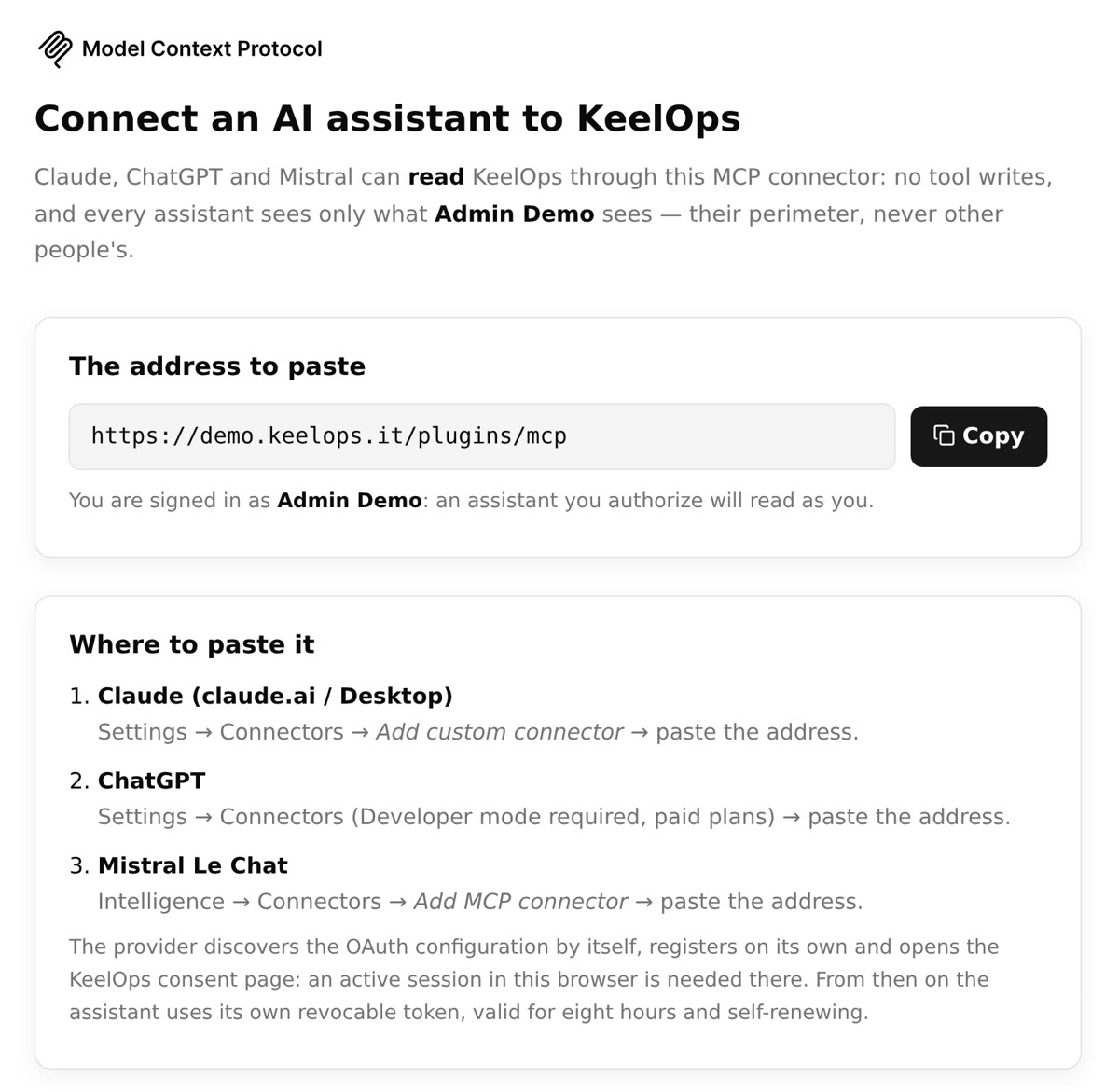
The MCP connector plugs in the assistant you already use — Claude, ChatGPT, Mistral — and it reads KeelOps with your identity. The pro version goes further: it opens the attachments and the documents on Google Drive, extracts their content (PDF, Word, spreadsheets, slides) and pseudonymises it before sending. The names of customers and people, companies and products become stable placeholders — [[PERSON_1]] is always the same person — so Claude and ChatGPT get the reasoning and not your customer list. The assistant is told the filter is on, and which entities are masked.
Two editions
The same KeelOps. Pro adds customers, integrations and AI.
Same code, same database, same updates. The community edition is complete for a team’s internal work; pro is for those who also handle customer requests and want AI and integrations.
| What | Community | Pro |
|---|---|---|
| Licence | AGPL-3.0, free software | commercial |
| How it is installed | source or Docker image, on your server | in our cloud, or licensed on your server |
| Support | the community, on GitHub | Jugaad, under contract |
| Deadlines, recurrences, sequences, WIP limits | yes | yes |
| Deals, pipeline, forecast, companies and contacts | yes | yes |
| Projects, kanban, table, agenda, search | yes | yes |
| Timesheet: grid, summaries for managers, month closing | yes | yes |
| Full timesheet: suggested hours, reminders, productivity, reports, absences | — | yes |
| Tickets, customer portal, help desk | — | yes |
| osTicket, form in your app, API | — | yes |
| Sign-in with Google, Drive | — | yes |
| AI: index, estimates, won deal, release notes | — (the queue, yes) | yes |
| Free plugins · pro plugins | 3 · — | 3 · 5 |
Try the difference before you choose: community.keelops.it and demo.keelops.it, same data.
Open source
On GitHub, under the AGPL.
KeelOps has been in production in real companies for months. The community edition is free software under the AGPL-3.0: the core, the SDK and three free plugins (Personal boards, Task map, MCP connector), with documentation in English. Install it yourself and pay nothing. The pro edition adds tickets and the customer portal, integrations, the full timesheet, Google services, the AI features and the pro plugins: in the cloud, or with a licence to install it on your own server. The database is the same: you move from one to the other without migrating anything.
The community edition comes in two forms: the source code on GitHub and a Docker image (ghcr.io/dariofinardi/keelops-community) with the docker-compose.yml that puts HTTPS in front of it. One command, docker compose up -d, and it runs on your server with SQLite or MariaDB.
Contributors sign a CLA: the code stays AGPL for everyone, the author keeps the copyright, and Jugaad may also use it in the pro edition.
Who uses it
Born in-house, grown with customers.
KeelOps is the tool Jugaad works with every day, and the one we use to follow the products and companies that chose us: their tickets, projects and deals all go through here.


Live demo
Ten minutes, with made-up data.
The demos are separate installations in every respect — another server, another database, other data: demo.keelops.it is the pro edition, community.keelops.it the community one, with the same data. Pro has seven profiles: administrator, sales, development, administration, a portal customer and two people from quality, so you can see what changes from one role to the next.
What to look at: a developer’s day; a pipeline with its weighted value; a project with its subtasks; a month of timesheet; a request opened by a customer that became a task; the task map of a project (the ⋯ menu on the project page). In the community: the same, without tickets, and with the basic timesheet.
Ask for the demo credentials with the form below, or find them on the demo page itself.
Keep in touch
We write when there is news. That is all.
One message when an important release comes out, one when the cloud opens for sign-ups. Nothing else, and one click to unsubscribe.
One address, nothing else. See the privacy notice: no tracking, one click to unsubscribe.