Pages in the application
A plugin's pages are ordinary HTML served by its routes or its static folder. The application shows them in a same-origin frame: in the main area when the person opens the plugin from the menu, inside a core page when the plugin is anchored there, under a button of the top bar. Same origin means the session cookie, the theme and the language all arrive by themselves.
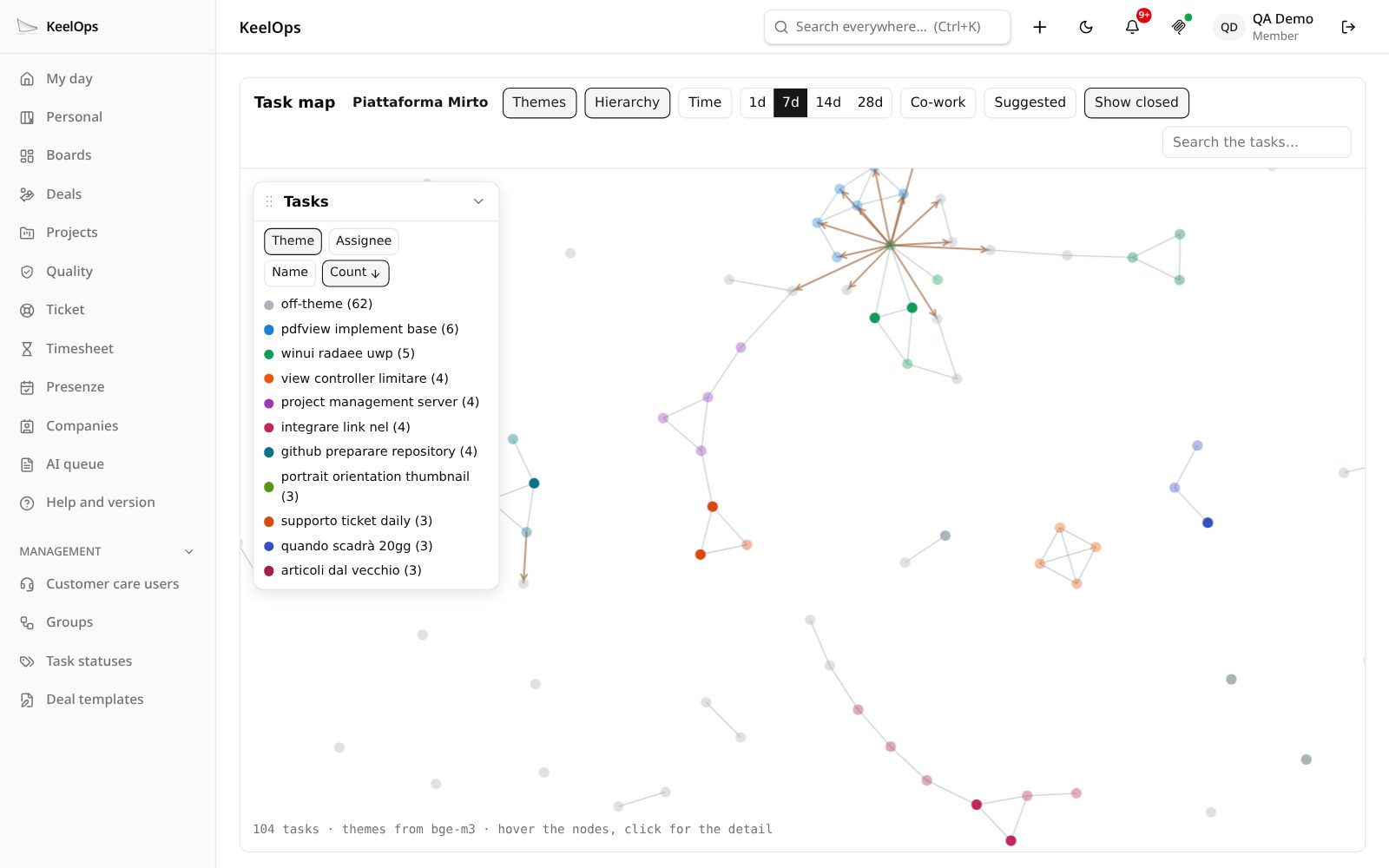
The task map (TasksMap) is a plugin that lives inside a core page: it has no menu entry, it is opened from the ⋯ menu of a project, and it draws the project's tasks as a graph — themes read from the text by the local models, hierarchy, time windows, who worked with whom.
Where a page shows up
| how | manifest | what the person sees |
|---|---|---|
| Menu entry | ui.voce, ui.icona, ui.menu: true | an entry in the side menu; the page fills the main area at /estensioni/<name> |
| Anchor | anchors: { project: true } … | a command inside a core page (a menu item, a button) that opens the plugin with a reference in the query string |
| Panel | anchors: { dashboard: true }, task, … | the plugin's page inside a core page, framed, sized to its content |
| Bar button | ui.barra | a button between the bell and the profile, with a state dot and a small panel |
The query string of /estensioni/<name>?… is passed to the plugin's page as it is, so an anchor that opens ?progetto=<id> lets the page read new URLSearchParams(location.search).get("progetto").
Anchors
An anchor declares which part of the application the plugin is a child of. The core draws the command only where a plugin with that anchor exists: with no plugin, the interface says nothing about plugins.
| anchor | command | opens the plugin with |
|---|---|---|
project | ⋯ menu of a project | ?progetto=<projectId> |
profile | profile menu | — |
deal | a button among a deal's attachments (for who can edit it) | ?offerta=<dealId> |
docx | a button on a .docx attachment (for who can edit the task) | ?allegato=<attachmentId>&task=<taskId> |
task | a panel inside the task detail | ?task=<taskId> |
dashboard | a tile on the dashboard | ?ancora=dashboard |
dashboardGroups | a pill in the dashboard groups | ?ancora=dashboardGroups&gruppo=<key> |
The anchor says where the page opens, not what the person may do there: the page checks permissions with the core (ctx.tasks.read, ctx.perimeter.canEditTask) before offering a command.
Panels
A page shown inside a core page (?ancora=… in the query) should:
- drop its own header — the core page already has one;
- load
sdk/riquadro.js, which tells the host how tall the page is after every layout change, so the frame follows the content; - say when it has nothing to show, so the host hides the frame instead of leaving an empty box:
window.parent.postMessage({ tipo: "keelops:vuoto", vuoto: true }, location.origin);
// and { tipo: "keelops:vuoto", vuoto: false } to be shown again
The dashboard groups (Overdue, Today, Tomorrow, Next days, No deadline) have a third pill besides Mine and Supervised when a plugin declares dashboardGroups: the plugin answers GET api/gruppi with the counts — { gruppi: { overdue, today, tomorrow, next, none } } — and the pill opens its page with ?ancora=dashboardGroups&gruppo=<key>.
The bar button
"ui": { "barra": { "icona": "mcp-icona.svg", "stato": "api/barra", "pannello": "barra" } }A button in the top bar, between the notifications bell and the profile. The core draws it; the plugin says what it means:
icona: a monochrome file in the static folder, or an icon name;stato: a route answeringGETwithtono(tone) colours the dot —accesogreen,spentogrey,bloccatoamber,nessunono dot;lampeggia(blink) makes it pulse;titolois the tooltip, already translated in the person's language;{ "tono": "acceso", "lampeggia": true, "titolo": "MCP · pseudonymisation on · Claude just read something" }pannello: a page of the plugin, opened in a small frame under the button (loadsdk/riquadro.jsin it).
The core reads the state every minute, when the panel closes, and at once when the plugin signals it with ctx.segnali.invia(userId) — see signals. The MCP connector pro uses it to show whether pseudonymisation is on and to blink while an assistant is reading.
The look
BASE_CSS from ui.mjs gives a page the application's colours, font and radius. It imports /api/tema.css, which the core generates already resolved for the person looking: light, dark, or following the system. Serve it from a route, or interpolate it in a server-rendered page:
["GET", /^\/base\.css$/, (req, res) => {
  res.writeHead(200, { "content-type": "text/css; charset=utf-8" });
  res.end(BASE_CSS);
}],
The variables to use in your own CSS:
| variable | what |
|---|---|
--carta | page background |
--inchiostro | text |
--tenue | secondary text |
--filo | borders |
--rilievo | cards, raised surfaces |
--accento, --accento-fondo | the accent colour and its soft background |
--pericolo | destructive actions, errors |
--raggio | corner radius |
--font | the system font stack, 15px |
CARD_CSS adds a centred single card (consent pages, notices). ICONS holds a few of the application's glyphs as inline SVG.
Theme
Load sdk/tema.js (the core serves it for every plugin). It watches the application around the frame and mirrors its theme on <html data-tema="light|dark">, live — the person flips the switch in the bar and the plugin changes with everything else. Colours of your own go under [data-tema="dark"], never under prefers-color-scheme: that is the operating system's choice, not the person's.
Translations
KeelOps speaks Italian, English, French, German and Spanish, and so should a plugin page. The SDK has one mechanism, served as sdk/traduzioni.js: Italian is the key, the language is the one chosen in KeelOps, a missing phrase falls back to English and then Italian, {name} is replaced.
<script src="sdk/traduzioni.js"></script>
<script src="i18n.js"></script>
<h1 data-i18n="Le mie note"></h1>
<input data-i18n-placeholder="Cerca una nota…">
<button data-i18n-title="Aggiorna">↻</button>
// ui/i18n.js — the plugin brings only its catalogues
window.KeelOpsI18n.crea({
en: { "Le mie note": "My notes", "Cerca una nota…": "Search a note…", "Aggiorna": "Refresh", "{n} note": "{n} notes" },
fr: { "Le mie note": "Mes notes", "Cerca una nota…": "Chercher une note…", "Aggiorna": "Actualiser", "{n} note": "{n} notes" },
de: { … },
es: { … },
}, { titolo: "Le mie note" });// ui/app.js — set the person's language, then translate in code
const me = await (await fetch("api/me")).json(); // your route: { locale: user.locale }
window.i18n.imposta(me.locale); // "imposta" = set
list.textContent = t("{n} note", { n: notes.length });data-i18n,data-i18n-placeholderanddata-i18n-title(which also setsaria-label) translate static labels on their own.t(key, values)translates in code.- A page built with a bundler (React, Vite) keeps its own small
i18n.tswith the same rules: it does not load extra scripts. - Keep the four catalogues complete. A test in the core reads every plugin's pages, collects the phrases passed to
t()anddata-i18n*, and fails on one missing in any language.
The Content Security Policy
Production serves every page with script-src 'self'. An inline script is not executed — silently, and only in production (development runs without the policy, so it looks like it works). Put code in files; the SDK scripts are files the core serves for you (sdk/tema.js, sdk/riquadro.js, sdk/traduzioni.js). Forms may only post to the same origin: to send the browser elsewhere (an OAuth consent), use a link, not a form.